

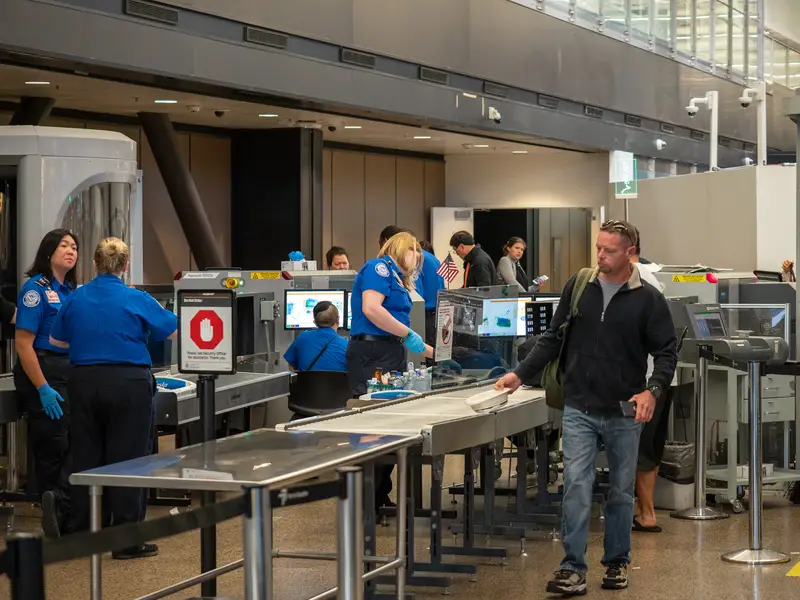
Flying with your favorite gadgets seems simple enough until you reach airport security. Most travelers know about the liquid rules and shoe removal routine, but electronics bring a whole different set of regulations that can catch you off guard. The TSA has specific rules about what you can and cannot bring, and breaking them could cost you up to $17,062 per violation. That’s not pocket change for trying to pack your gaming console the wrong way or forgetting to charge your phone.
Your device needs to turn on at security
Arriving at the airport with a dead phone or laptop isn’t just inconvenient anymore. TSA officers have the authority to ask you to power up any electronic device you’re carrying, including phones, tablets, and cameras. If your device won’t turn on, they won’t let it through security. This rule exists because agents need proof that your device is actually what you claim it is, not something hiding dangerous materials or explosives inside a fake shell.
The power-on requirement means you should charge everything before heading to the airport. Bring charging cables in your carry-on bag in case you need a quick boost before security. Items that require wall outlets or take forever to start up will slow you down. Smart travelers test all their devices the night before and pack portable chargers. TSA officers won’t read or copy your information, but they do have final say on whether any item passes through the checkpoint, regardless of what the official rules state.
Power banks must stay in your carry-on
Portable battery packs have become essential travel companions, but they come with strict placement rules. TSA does not allow power banks with lithium-ion batteries in checked luggage at all. These batteries pose a fire risk in the cargo hold where crew members can’t access them quickly. You must pack all portable chargers and battery banks in your carry-on bag where they remain visible and accessible throughout the flight.
This rule applies to any device with a lithium-ion battery that can be removed. Spare batteries for cameras and other gadgets fall under the same restriction. Airlines and TSA take battery safety seriously after several incidents involving lithium batteries catching fire. The good news is that you can bring multiple power banks in your carry-on, so you won’t run out of charging options during your trip. Just make sure they’re easily accessible when packing, since you might need to show them separately during screening.
Laptops and game consoles need separate screening
That protective case for your laptop might keep it safe from scratches, but it needs to come off at security. TSA requires you to remove laptops, video game consoles, and printers from their cases and place them in separate bins for X-ray screening. This includes your Xbox, PlayStation, or Nintendo Switch when it’s docked. The screening equipment needs a clear view of these larger electronics to ensure nothing suspicious hides inside or behind them.
Taking everything apart and putting it back together at security adds time to your airport experience. Pack your electronics strategically so they’re easy to access and repack. Keep cables organized in pouches so they don’t tangle when you’re rushing to catch your flight. Tablets and iPods get a pass on this rule since they’re smaller and don’t require separate bins. Some airports offer TSA PreCheck lanes where approved travelers can leave laptops in their bags, but standard screening still requires the full removal process for most passengers.
Discs must come out of devices
Still traveling with DVDs, CDs, or old cassette tapes? TSA has a specific rule about them that many travelers miss. You cannot leave these media inside any electronic device during screening. That means removing discs from laptops, taking CDs out of portable players, and ejecting cassettes from any audio equipment. The screening equipment needs to examine both the device and the media separately to ensure nothing dangerous hides between them.
This rule feels outdated in the streaming age, but it matters if you’re bringing physical media for work presentations or entertainment during your trip. Pack your discs in protective sleeves and keep them easily accessible in your carry-on. The TSA screening process moves faster when you remember to remove media before reaching the conveyor belt. You can put everything back together once you clear security and head to your gate. The extra step takes only seconds but prevents delays and potential additional screening.
Samsung Galaxy Note 7 phones are completely banned
Remember the Samsung phone that kept catching fire? The Galaxy Note 7 remains banned from all flights, even years after Samsung recalled them. You cannot bring this specific phone model in carry-on bags or checked luggage. The device earned its permanent ban after multiple reports of batteries overheating and causing fires. If you somehow still own one and didn’t return it during the recall, leave it at home when you travel.
This ban applies whether the phone is turned on or off. TSA officers know to look for this model and will confiscate it if found. The Galaxy Note 7 represents the only consumer smartphone with a complete flight ban. Other Samsung phones are perfectly fine to bring, so don’t worry if you have a different model. Airlines take this restriction seriously because of the documented fire hazard. Most people have upgraded by now, but the ban remains in place as a safety precaution for all passengers and crew members.
Extension cords are allowed but must be wrapped
Need to bring an extension cord for your hotel room? TSA allows them, but they must be properly wrapped and secured. Loose cords with tangled wires look suspicious on X-ray screens and might trigger additional screening. Use twist ties, velcro straps, or cable organizers to keep your extension cords neat and compact. This simple step helps TSA officers quickly identify what they’re looking at and speeds up the screening process for everyone.
You can pack extension cords in either carry-on or checked luggage. Many travelers bring them for charging multiple devices in hotel rooms that never seem to have enough outlets near the bed. Power strips work the same way and follow identical rules about being wrapped. The TSA wants to see organized cables that clearly show their purpose. Messy, tangled cords might get pulled aside for manual inspection, adding unnecessary time to your security screening. Spending two minutes to wrap your cords at home saves headaches at the airport.
Spillable batteries will get confiscated
Most travelers won’t encounter this issue, but it’s worth knowing about spillable batteries. These are batteries that can leak if not kept in a specific position or stored a certain way. TSA regulations prohibit them because leaking battery acid in an aircraft cabin or cargo hold creates serious safety hazards. Common gadgets use sealed batteries that don’t fall under this restriction, so your phone, laptop, and tablet are fine.
The spillable battery rule mainly affects people traveling with specialized equipment or older technology. TSA makes an exception for wheelchairs and other mobility devices that might use these types of batteries. If you’re unsure whether your device contains spillable batteries, check the manufacturer’s specifications or contact TSA before your flight. Regular alkaline batteries and standard rechargeable batteries don’t qualify as spillable, so most consumer electronics pass this requirement automatically. When in doubt, stick with modern devices that use sealed lithium-ion or lithium-polymer batteries designed for safe travel.
Radios must fit under seats or overhead bins
Bringing a radio in your carry-on bag comes with a practical size requirement. TSA allows radios on planes, but warns that you need to check if yours fits under the seat in front of you or in the overhead compartment. This isn’t really a TSA rule as much as an airline size restriction, but it affects whether your radio makes it onto the plane. Oversized items that don’t fit in designated storage areas must be checked, where they face rougher handling and potential damage.
Most portable radios and small audio devices won’t cause problems. The warning applies to larger boom boxes or professional audio equipment that some people try to carry on. Measure your radio and compare it to your airline’s carry-on size limits before packing. If it’s too big, you’ll need to check it or ship it separately. Remember that checked electronics face higher risks of damage or theft, so consider whether bringing a large radio is worth the hassle and potential loss.
TSA officers make the final call on everything
Here’s the part that surprises most travelers: even if your electronic device follows every written rule, the TSA officer at your checkpoint has ultimate authority to deny it. The official TSA website clearly states that the final decision rests with the screening officer. This means that items on the approved list can still be rejected if an officer finds them suspicious or questionable for any reason. Even something as innocent as an Apple AirTag in your luggage could be denied if the officer decides it poses a concern.
This discretionary power exists because security situations vary and officers need flexibility to respond to potential threats. If you bring a questionable electronic item that you can manage without, consider leaving it at home to avoid conflicts at security. Being polite and cooperative with TSA officers helps your case if questions arise about your devices. Arguing or resisting the screening process can result in fines up to $17,062 for a first violation, with even higher penalties for repeat offenses. The best approach involves knowing the rules, following them carefully, and respecting the authority of screening officers even when their decisions seem frustrating.
Airport security rules about electronics protect everyone on the plane, even when they feel inconvenient. Taking a few minutes to charge your devices, organize your cables, and pack everything according to TSA guidelines saves time and stress at the checkpoint. Know what you’re bringing, be ready to power it on, and keep questionable items at home when possible. Your smooth trip through security starts with understanding these rules before you reach the airport.

