

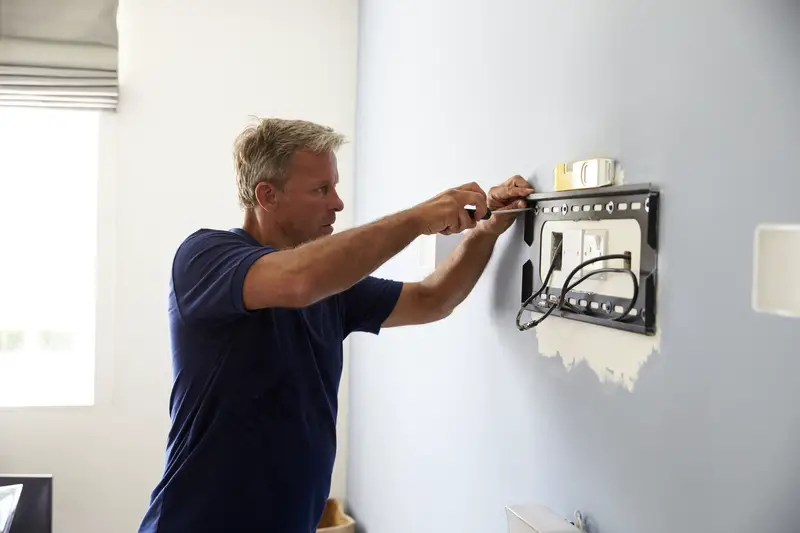
So you just bought a beautiful 65-inch TV. You’re excited. You watched a two-minute YouTube video, grabbed a drill, and you’re ready to slap that thing on the wall like a piece of modern art. I get it. I’ve been there. But here’s the thing — a terrifying number of people skip the single most important step in the entire process, and it costs them hundreds (sometimes thousands) of dollars in damage.
Before you drill a single hole, you need to find the studs in your wall. Not “probably should.” Not “it’s a good idea.” You absolutely must. And the way most people mess this up is more surprising than you’d think.
Drywall Is Basically Fancy Cardboard
Here’s a fact that should make you nervous: a screw driven into drywall alone can only support about 5 to 10 pounds before ripping out. Your average modern flat-screen TV weighs somewhere between 30 and 80 pounds. Some are heavier. So if you drill your mount into nothing but drywall, you’re not mounting a TV — you’re building a time bomb.
Drywall is just compressed gypsum powder sandwiched between two sheets of paper. That’s it. It was never designed to hold anything heavy. It exists to give you flat, paintable walls. Asking it to support a 55-pound TV on a lever arm is like asking a paper plate to hold a Thanksgiving turkey. It might look fine for a minute. Then gravity wins.
The studs — those vertical wooden beams hiding behind your drywall — are the actual skeleton of your wall. When you sink lag bolts directly into solid wood studs, you’re anchoring to the structural frame of your house. That’s the only connection strong enough to keep your TV where you put it.
The “Heavy-Duty Anchor” Myth That Won’t Die
Walk into any hardware store and you’ll find packages of drywall anchors marketed as “heavy duty” that claim to hold 50, 75, even 100 pounds. People see these and think they’ve found a loophole — no stud finder needed, just screw in these bad boys and call it a day.
The Home Depot’s own installation guide is pretty blunt about this: do not use hollow-wall anchors for TV mounting. They cannot support the weight of both the mount bracket and the television. And here’s the detail people miss — building codes and manufacturers recommend your anchors support four times the combined weight of your TV and mount. So if your TV and bracket together weigh 60 pounds, your wall connection needs to handle 240 pounds. No drywall anchor is doing that.
The reason is physics. A TV mount isn’t just holding dead weight straight down. Full-motion mounts extend outward from the wall, creating leverage. That pulling force on the screws is dramatically higher than the TV’s actual weight. It’s the same reason a door feels heavier when you push near the hinge instead of the handle.
You Don’t Even Need to Buy a Stud Finder
One of the biggest excuses I hear: “I don’t have a stud finder and I’m not buying a $30 tool I’ll use once.” Fair enough. But you almost certainly have what you need already sitting in a kitchen drawer.
Grab a strong refrigerator magnet and slowly drag it across the wall at roughly four feet from the floor. Drywall is attached to studs with metal screws or nails, so when the magnet passes over one, you’ll feel a distinct pull. That tug tells you exactly where a stud is hiding. It sounds too simple to work, and yet it’s a trick professional installers actually use as a quick-check method.
Another trick: every electrical outlet and light switch in your house is attached to a stud on one side. Knock on both sides of any outlet — whichever side sounds solid instead of hollow, that’s your stud. From there, studs are typically spaced 16 inches apart in most American homes. Measure 16 inches from that first stud and knock again to confirm. You can map an entire wall this way in about three minutes.
Your phone can even do the job. Apps labeled “Stud Finder” use your smartphone’s built-in magnetometer (the same sensor that makes your compass app work) to detect the metal fasteners in your wall. Is it as accurate as a dedicated electronic stud finder? Not quite. But it’s free and it’s already in your pocket.
That Spot Above Your Fireplace Is Probably a Terrible Idea
I know, I know. Every home design show puts the TV above the fireplace. It looks great in photos. It’s also one of the worst places to mount a television.
Samsung specifically warns that their TVs should never exceed 104°F. If you have a wood-burning fireplace — or even a gas one — the heat rises directly into the TV. Before committing to that spot, Samsung’s own guidance says to light a fire and actually check the temperature where the TV would sit. Most people never do this and then wonder why their $1,200 TV starts having display problems two years later.
Beyond the heat, there’s the viewing angle problem. A TV above a fireplace mantel is almost always way too high. You end up craning your neck upward like you’re in the front row of a movie theater. The correct height — and this surprises most people — is much lower than you’d think.
Most People Hang Their TV Way Too High
The general recommendation from multiple sources is that the center of your TV screen should be roughly 42 inches from the floor. That feels low to most people when they’re standing in front of the wall with a drill. But remember — you’re not watching TV standing up. You’re watching it from a couch.
Here’s the rule: the bottom of the screen should be no higher than your eye level when seated, and the top of the screen should be no higher than your eye level when standing. Sit on your couch, have someone measure from the floor to your eyes, and use that number as your guide for where the middle of the screen goes.
A clever trick before drilling: cut out a piece of cardboard the same size as your TV and tape it to the wall with painter’s tape. Then sit in every seat you’d normally watch from. Live with it for an hour. Walk around the room. If it feels too high from any primary viewing spot, move it down. It’s a lot easier to reposition tape and cardboard than to patch drywall holes.
VESA Sounds Made Up but It Matters
If you’ve ever looked at the back of a TV, you’ve noticed four holes arranged in a rectangle. Those holes follow a standard pattern created by the Video Electronics Standards Association, and the spacing between them is called your VESA size. This is how you make sure a mount actually fits your TV.
The measurements are in millimeters. If the holes are 400mm apart horizontally and 200mm vertically, your VESA size is 400×200. The screws you need depend on this size too — smaller patterns under 200mm use M4 screws, 200×200 patterns use M6, and larger screens need M8 screws. Get the wrong screws and you’ll either strip the holes or not get a secure fit.
Most people just assume any mount works with any TV. It usually does — kind of — because most mounts are adjustable. But two mounts rated for the same screen size can have wildly different weight limits. A mount that fits a 65-inch TV might be rated for 55 pounds with one brand and 150 pounds with another. Always check the weight rating, not just the screen size.
The Cable Situation Nobody Thinks About Until It’s Too Late
You find the studs. You mount the bracket. You hang the TV. It looks amazing. Then you step back and see a hideous tangle of power cords, HDMI cables, and coax draped down the wall like some kind of tech waterfall. The aesthetic victory you just achieved? Gone.
If you’re going to run cables inside the wall — which is the cleanest look — you need cables rated for in-wall installation. Look for a UL rating labeled CL2 or CL3. Regular cables aren’t rated for this and technically violate building codes in most areas. A power relocation kit lets you add an outlet directly behind the TV without hiring an electrician, since the kit uses your existing outlet and routes power through the wall with pre-wired connections.
One smart move: run an extra HDMI cable while you’re at it. If you’re already fishing cables through the wall, adding one more takes almost no extra effort. But if you decide to add a game console or streaming device six months later and the wall is sealed up? You’re starting from scratch. Same goes for an Ethernet cable if your router is nearby — hardwired connections are always faster and more reliable than WiFi for streaming 4K content.
A $46 Billion Industry Built on a 15-Minute Job
The global TV mount market was worth $13.5 billion in 2023. By 2031, that number is projected to hit $46.74 billion. Wall mounting went from a niche thing that home theater nerds did to something almost everyone does — or at least wants to do.
And yet the actual installation, done right, is shockingly straightforward. Find studs. Mark them. Level the bracket. Drill pilot holes. Drive lag bolts. Hang TV. Connect cables. The whole thing takes maybe 30 to 45 minutes if you know what you’re doing. Professional installation starts at $70 to $100 for a basic job, which is money well spent if you’re not comfortable with a drill. But if you are? The mount itself is often the biggest expense.
The point isn’t that mounting a TV is hard. It’s that the one step most people rush through — finding and confirming the studs — is the difference between a TV that stays on your wall for a decade and one that ends up face-down on your hardwood floor at 2 a.m. on a Tuesday. Take the extra five minutes. Your TV (and your floor) will thank you.

